AI Product Photography Without a Studio (or a Photographer)
A kitchen windowsill can out-shoot a rented studio these days. Here's how sellers do it with AI prompts — and the five tells that give a fake away.
mypromt
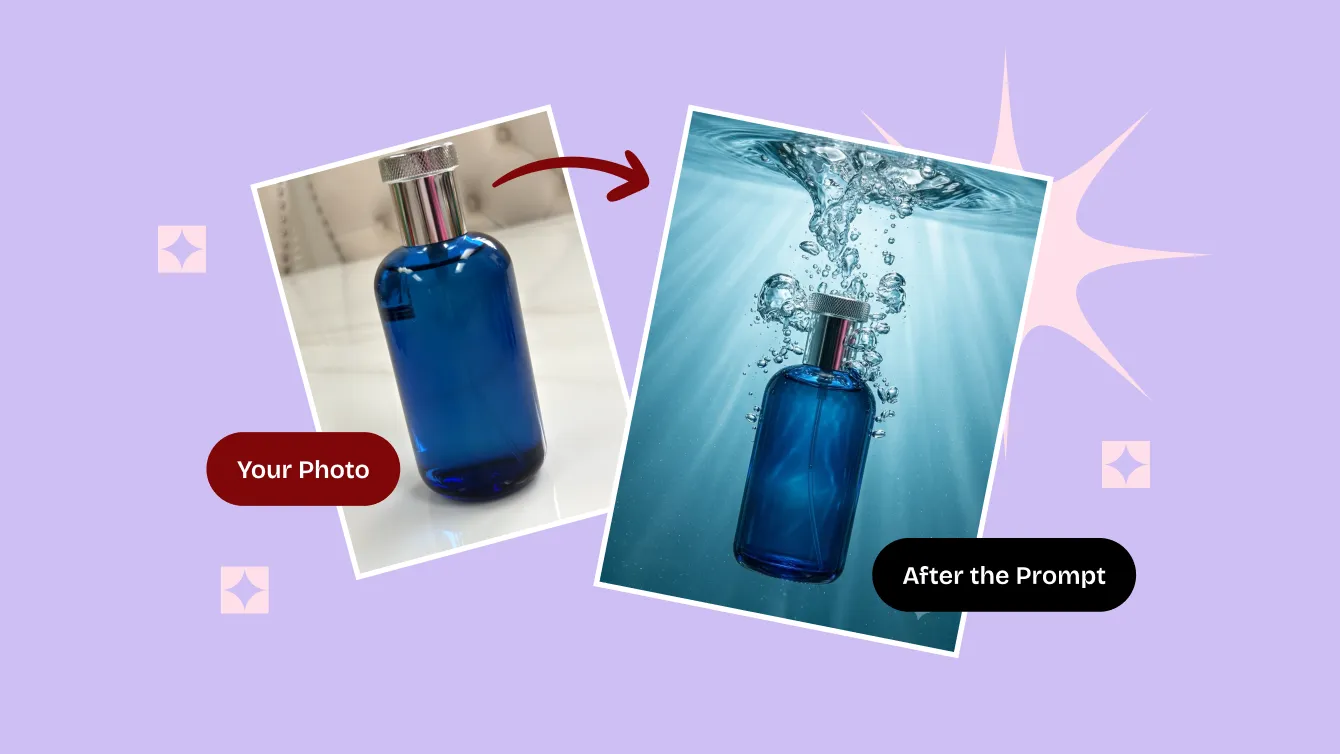
Last spring a woman who makes candles got three quotes from photo studios. The friendliest one came back at $45 a photo, four weeks out. She has 40 products, and every product needs a clean shot, a cozy shot, and something loud enough for ads. Somewhere around the third calculation she realized she was pricing a used car.
So she gave up and shot everything herself. iPhone, kitchen windowsill, an afternoon. Then she ran each photo through an AI prompt that swapped the windowsill for a studio. Nine days later the whole catalog was live.
This is where AI product photography actually sits right now. It is not coming for wedding photographers or Vogue covers. It is quietly solving the boring, expensive problem of getting forty products to look presentable before the season ends.
What the model is good at, and where it quietly gives up
The way these prompts work is unglamorous: you hand the model your photo, and it rebuilds everything around the product. Background, light, surface, shadows, mood. The product itself stays yours.
It is genuinely good at that. Your cluttered counter becomes seamless white. Flat window light becomes directional studio light that falls off the way real light does. The same bottle can sit on a bathroom shelf, on beach sand, or in someone's hand, depending on what you asked for. One source photo can carry a summer set, a holiday set and a minimalist set, all made in an afternoon.
And then there are the things it cannot do, which nobody mentions in the demo videos.
It cannot invent detail your photo never had. If your label is soft and blurry in the original, the model will improvise letters. Confidently. Your Lavender Fields comes back as Lavendor Feilds and you will not notice until a customer does.
It cannot fix your angle either. Shot from above stays shot from above, forever, no matter how nicely you ask.
And it cannot pretend a product exists. Marketplace image rules vary in the details but agree on the important part: the photo has to show what actually ships. Restyling the background of your own product is retouching. Generating a product you have never manufactured is a different word entirely.
All of which means the source photo is doing most of the work, so it is worth ten minutes of attention. Fill the frame. Even light, no harsh shadow from a ceiling lamp. Plain surface. Shoot at the height of the product instead of looming over it like a hawk. That's it, that's the whole course.
The four photos that actually sell
Different photos have different jobs, and a listing with only one of them is leaving money on the table.
The white one, which nobody looks at but everybody needs
This is the thumbnail fighting for attention in search results. Most marketplaces want it on plain white, and a few insist. It is also the easiest one to get subtly wrong, because a product with no shadow underneath doesn't look clean, it looks like it's levitating during a séance.
A prompt that works here names four things and then stops talking: the surface, where the light comes from, how the shadow behaves, and how far away the camera is. Roughly:
Place the product on a seamless white surface, soft large-source light from the upper left, a soft contact shadow directly beneath the base, shot at product height with a 50mm lens, no props.
The luxury white studio shot with light caustics adds those little pooled highlights that make glass and glossy packaging look like they cost more than they do. If you're shooting two things at once and the composition keeps collapsing, Scandinavian double-watch campaign shot has already solved that argument.
The cozy one, which does the actual selling
This is the photo that answers "what would this look like in my house," and it carries nearly all of the emotional weight of a listing.
The one rule: the surface has to match the price. Linen and pale wood say handmade and calm. Travertine and a beach tote say expensive summer. Chrome and dark glass say a man is going to buy this for himself and call it a tool.
For home goods and anything craft-shaped, candle lifestyle shot on linen and light wood. For seasonal drops, travertine flat lay with a summer beach tote.
The one that looks like a customer took it
Ads that look like ads get scrolled past at a speed that should be studied by physicists. A photo that looks like someone's friend took it on their phone converts for a fraction of the cost, which is how "UGC style" turned into a genre with its own conventions.
What sells the illusion is imperfection: a hand in frame, framing that's slightly off, a background that is obviously a real place, light that nobody bothered to fix. Poolside UGC photo with product in hand and first-person UGC beach product photo are built around exactly that studied sloppiness.
The loud one, for ads, where subtlety goes to die
Product mid-splash. Product falling into a bag. Product exploding out of frame for reasons that make no physical sense.
Nobody buys a candle because it is underwater. They stop scrolling because it is underwater, and stopping the scroll is the entire job. Keep it out of your listing gallery and put it in the ad: underwater splash product commercial, product falling into a summer beach bag. The rest of the Products category is sorted along the same four jobs.
Clothing, where AI still visibly sweats
Fabric is the hard part. Models understand "cotton" as a word and not as a thing that drapes, so this is where fakery shows first.
Two approaches survive contact with reality. The first is the ghost mannequin: shoot the garment on a cheap dress form, and let the prompt dissolve the form while keeping the shape and the inner collar. It is the standard look for apparel listings and normally something you pay a retoucher for. Here it's a $3 prompt you keep. Headwear studio product shot does the same for caps, where the crown shape is the whole product.
The second is on-model, which is harder to pull off and worth the trouble for shoes and accessories, where fit is what people are actually buying. Sneakers on feet studio lookbook shot for the clean version, film-look sneaker street style photo for the one that pretends it was shot on a real street in 2003. More of them live in Product photos.
Five ways a fake gives itself away
Nearly every disappointing result comes down to one of these.
It floats. No contact shadow where the product meets the table. Models drop it constantly, so ask for it by name and the séance ends.
The reflections argue with the light. A glossy bottle reflecting a window that exists in no version of the scene. This happens when you describe two light sources; describe one, and let it be.
The label melts. Text turns into letter-shaped suggestions. Keep the label sharp in your source, add "preserve the label text and logo exactly," and if it still garbles, generate the scene and paste your real label crop back on top. Not elegant. Very effective.
Everything looks moisturized. That suspicious AI sheen where leather, ceramic and plastic all end up the same material. Name the texture — "full-grain leather with visible pores," "matte ceramic with glaze pooling at the base" — and it comes back.
The set doesn't match. Eight photos, eight different light directions, one confused customer. This is the real reason to reuse one saved prompt across a whole catalog instead of improvising every time. Consistency is most of what makes a small brand look like a real one.
What it costs, honestly
A studio runs $40–150 a photo, or $25–40 on a bulk e-commerce package, with a wait measured in weeks. A prompt costs somewhere between nothing and a few dollars, runs in under a minute, and works again free every time you add a product.
The part that would be dishonest to skip: a good photographer notices problems you haven't thought of yet, and for one hero image a year that is worth paying for. For forty listing thumbnails, the difference has quietly stopped being visible.
Questions people actually ask
Do I need Midjourney?
No, and it's the wrong tool anyway. Midjourney draws you a beautiful bottle; it's just not your bottle. These are editing prompts — they take a photo you already have and change what's around it. They run in Google's Gemini image models (Nano Banana), in ChatGPT's image editing, in anything that accepts a picture plus an instruction.
How do I know a prompt works before I use it?
Drag the slider on any card. Original on one side, result on the other, no faith required. That's the reason the slider exists, and nothing goes into the library without it.
Can I use these on Amazon or Etsy?
Check each platform's current image policy, because they get updated quietly. They all rest on the same principle: the image has to represent the actual product. Changing your background and lighting is ordinary retouching. Adding a feature the product doesn't have is not, and buyers notice faster than moderators do.
How many photos does a listing need?
Five to seven. One white main image, two lifestyle, one detail or scale shot, one UGC, one showing what's in the box. From a single decent source photo that's about half an hour of work.
If you want to test the idea without committing to anything, take your best-lit product photo and try one white shot and one lifestyle shot from the Products category. Ten minutes will tell you whether this is going to work for your catalog — and if it isn't, you've lost ten minutes. And if it's people you need to photograph rather than products, that's a different job with the same five ingredients — the AI photoshoot guide covers that side.